How Background calendar sync works
Before you start: Create the property’s Direct Booking page and complete its Stripe and price settings. You need access to the matching Airbnb listing. Keep both calendar links private. Setup is per property, not per reservation.
Screenshots use sample data. Select any image to enlarge it.
Set up automatically with Airbnb Bridge
On the live SignalPanda site, open Direct Booking → Booking settings → Background calendar sync and choose Set up automatically. Use Airbnb Bridge 0.1.19 or newer and sign in to Airbnb yourself if prompted. Keep Direct Booking open until setup finishes.
Bridge creates or reuses this property’s private feed, adds it to Airbnb as SignalPanda, checks the saved connection, and saves Airbnb’s return link. An existing SignalPanda calendar with an unreadable or different URL needs manual review; setup will not overwrite it. Localhost calendars cannot be imported by Airbnb.
After setup, background sync works with your browser closed. Setup does not verify any booking’s dates or enable payment. If automatic setup cannot recognize Airbnb’s controls, use Manual setup and the steps below.
Understand the two calendar links
Airbnb’s export link lets SignalPanda read Airbnb availability. SignalPanda’s private calendar link lets Airbnb import approved direct-booking dates. You need both directions for background verification.
With Airbnb Bridge connected, approval uses a faster calendar check and block; keep the approval page open until it finishes. The background option does not require the extension or an open browser after setup.
Calendar directions - Airbnb → SignalPanda
- Airbnb availability and reservation dates
- SignalPanda → Airbnb
- Approved and confirmed direct-booking dates
The outbound feed contains stay dates without guest names, emails or payment amounts.
Save Airbnb’s export link in SignalPanda
In Airbnb, select the property under Calendar → Availability → Connect calendars → Connect to another website. Copy its Airbnb export link.
In SignalPanda, open Cleaning settings, select the same property, and expand Scheduling → Airbnb iCal. Paste the link into Airbnb iCal URL and select Save & Sync. If this property already has a working link, keep it and use Refresh Link to check it.
These are desktop Airbnb instructions. See Airbnb’s calendar-sync guide for its current desktop and mobile steps.
Create SignalPanda’s calendar link
Open Direct Booking and find the same property. Expand Booking settings, then Background calendar sync → Manual setup, and select Create calendar link.
Copy the entire Private calendar link, including .ics at the end. Reuse this link for future reservations at this property; each property has its own link.
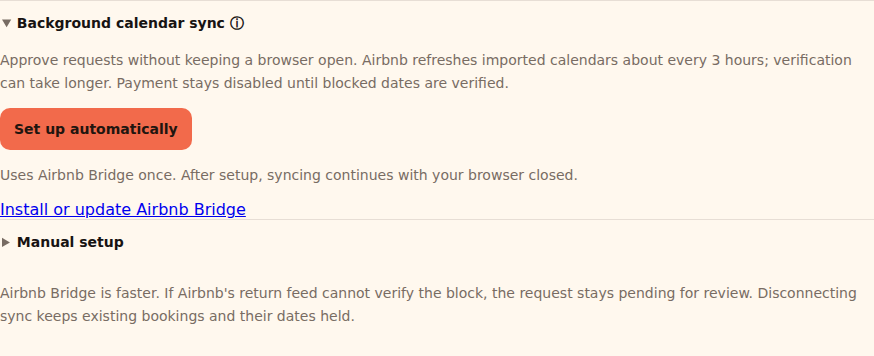
Use Set up automatically, or expand Manual setup for the calendar links and import confirmation. Import that link into Airbnb and confirm setup
Return to the matching Airbnb listing’s Connect to another website screen. Paste the SignalPanda link into the calendar address field, name it SignalPanda, and choose Add calendar.
Back in SignalPanda, tick I imported this calendar into the matching Airbnb listing and choose Save calendar setup. Tick this only after completing the Airbnb import. Repeat the setup for each property you want to connect.
Approve a request and wait for verification
Open a booking request from your email or Notifications. Review it and select Approve request. SignalPanda uses Bridge when connected; otherwise it uses your configured background sync. To choose the background option explicitly, select Approve with background calendar sync.
Approval first checks Airbnb availability and holds the dates in SignalPanda. Approved dates then appear in the calendar Airbnb imports. You can close the page while background verification runs.
Airbnb normally refreshes imported calendars every 3 hours. SignalPanda checks pending requests about every 5 minutes. Verification may take longer than three hours; elapsed time alone never enables payment. The guest receives a Booking approved — securing your dates email and has not been charged.
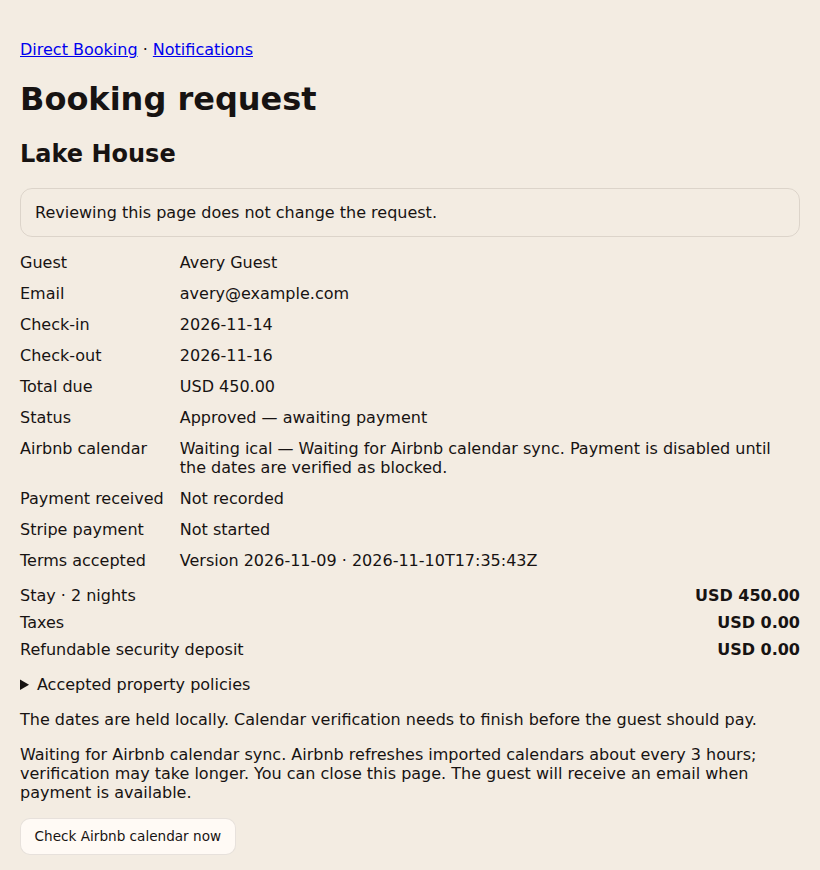
The request remains held while calendar verification is pending. You can close this page. Payment opens after the block is verified
Only after every requested night is verified as blocked does the guest receive Booking approved — ready for payment with their Stripe payment link. Successful payment confirms the stay; a pending bank payment keeps the dates held.
If Airbnb reports a reservation conflict, fails to respond, or does not expose clear blocked-date evidence, payment stays disabled. Review the request or use Bridge to complete verification. Importing the link or waiting three hours does not by itself confirm a booking.
More use cases
Follow the walkthrough that matches what you need to do next. Screenshots use sample data; select an image to enlarge it.
Check a request that is still waiting
Use this if the request has not progressed after Airbnb’s usual refresh interval.
- Check that both calendar links belong to the same property and that the SignalPanda calendar appears in Airbnb’s connected calendars.
- In Airbnb, select the imported SignalPanda calendar and use Refresh Calendar, if available. Airbnb limits manual refresh frequency.
- On the SignalPanda request, choose Check Airbnb calendar now. This reads Airbnb’s return feed; it does not force Airbnb to import our feed.
- Read the calendar status. If another reservation overlaps, resolve the conflict first. If the feed cannot verify the block, connect Airbnb Bridge in desktop Chrome, sign in to Airbnb, and choose Verify / retry Airbnb calendar block. Keep that page open until verification finishes.
What to expect: Payment remains unavailable until the dates are verified. Do not ask the guest to pay outside the booking flow to bypass the check.
Airbnb may not expose enough information in its export to verify an imported block. In that case, use Bridge or contact support. Approved holds do not expire automatically.
Frequently asked questions
Do I need a new link for every booking?
No. Keep the same private link connected for that property. Approved and confirmed direct-booking dates are included automatically; pending unapproved requests are not.
Does checkout day get blocked?
Only the occupied nights are exported. For a November 20–23 stay, the booked nights are November 20, 21 and 22.
Does unchecking setup cancel bookings?
No. It prevents new approvals using this background option. Existing holds remain, and the calendar link keeps exporting approved and confirmed stays. It does not remove the imported calendar from Airbnb.
Does calendar setup enable checkout cleaning?
No. Direct-booking checkout cleaning is a separate option for confirmed, paid SignalPanda direct bookings only. Airbnb and other channel cleaning schedules are managed separately in Cleaning.