How Competitors works
Start by checking the label under your listing, then follow the analysis from comparison to review.
What the listing labels mean
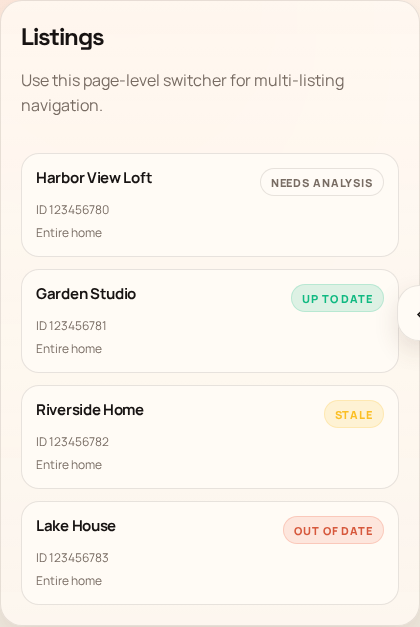
The label tells you whether a saved competitor snapshot exists and how fresh it is.
- Needs analysis
- No competitor snapshot has been imported yet.
- Running
- Signal-Panda is importing similar listings and price samples.
- Up to date
- The analysis completed within the last 24 hours.
- Stale
- The analysis is over 24 hours old but less than 3 days old.
- Out of date
- The analysis is at least 3 days old; refresh before pricing decisions.
- Error
- The latest analysis did not finish; open the listing and retry.
-
Select the listing and run analysis
Use Run all in the listing switcher to refresh all eligible saved Airbnb listings. Follow calendar preparation and analysis progress in Activity.
Run Analysis builds or refreshes the comparison data for the selected property. It imports the similar listings Airbnb associates with your property, collects available pricing and calendar signals for the upcoming pricing window, and summarizes how those listings compare by location, property details, ratings, occupancy, and price.
This is useful the first time you open a property, whenever its label is Stale or Out of date, and before making an important pricing decision. The analysis runs in the background and does not change your Airbnb listing. Fresh Airbnb imports require desktop Chrome, the SignalPanda Airbnb Bridge, and an active Airbnb sign-in.
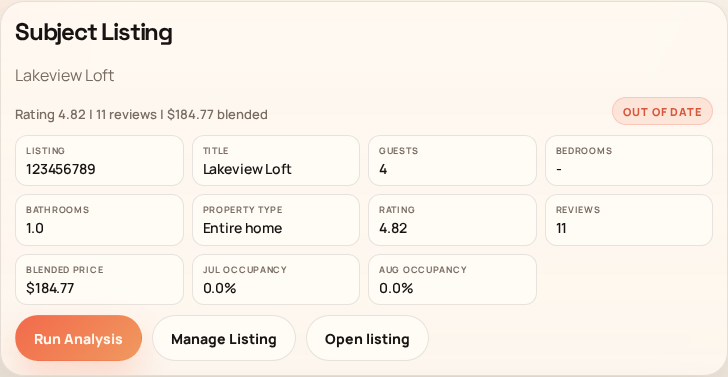
The subject card confirms the listing being analyzed and provides the refresh action. -
Read the recommendation curve
The Recommendation Curve turns the comparison data into a visual price guide for upcoming dates. In simple terms, each point answers: “Based on comparable listings, their availability, and current demand, what nightly price makes sense for this date?” It helps you spot dates where the market supports a higher price and dates where a more competitive price may be useful.
DRP is the daily view. WRP shows eligible 7-night stay starts, and MRP shows eligible 28-night stay starts. Your current and booked prices appear for context, selected competitors appear as comparison lines, and demand appears below the price chart. Use Radius to focus on closer properties and Selected Competitors to include or remove individual comparisons. Dragging an editable point stages a price inside Signal-Panda; it does not publish the price to Airbnb.
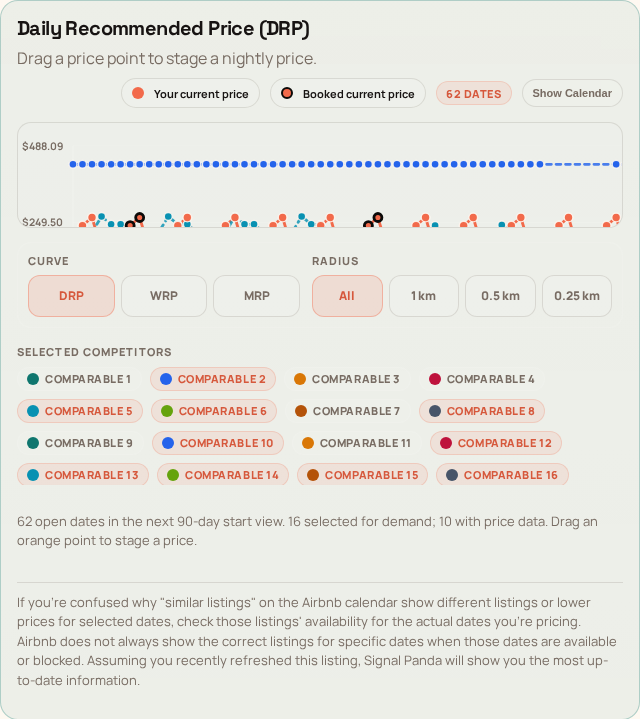
Current-price points and competitor traces give context; dragging an editable point only stages a change. -
Compare the listings behind the recommendation
Use the table to review price, occupancy, rating, reviews, similarity, distance, and Airbnb signals. Selecting or clearing a comparable updates the recommendation view. The calendars and map below the table help explain when and where demand differs.
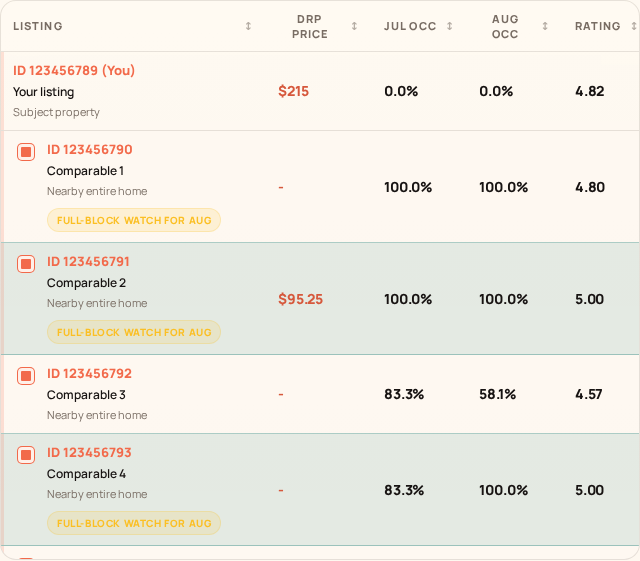
Warnings such as full-block watch flag availability patterns that deserve caution. -
Choose a pricing approach
Dynamic Pricing offers Booking Priority, Economy, Medium, and Luxury strategies. Set a minimum price and decide whether Lead Time should adjust prices by booking window. Booked, unavailable, and active-promotion dates remain visible but are excluded from editable model prices.
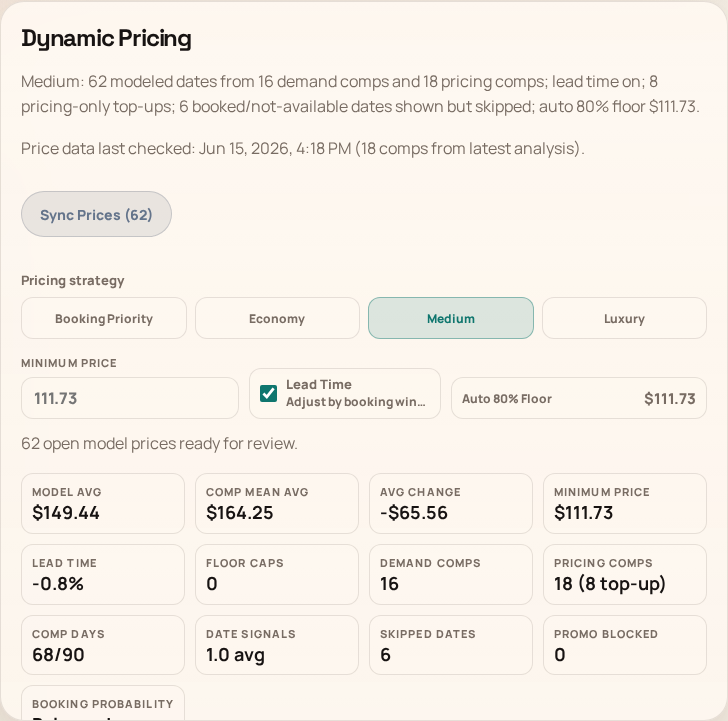
The summary shows the modeled dates, comparison coverage, floor, and average change before review. -
Stage first, publish only after review
Use Sync Calendar to refresh Airbnb state. A dragged chart point or saved nightly edit stays pending inside Signal-Panda. Sync Prices requires the extension and opens a before-and-after review before publishing. Use Clear Pending to discard local staged changes.
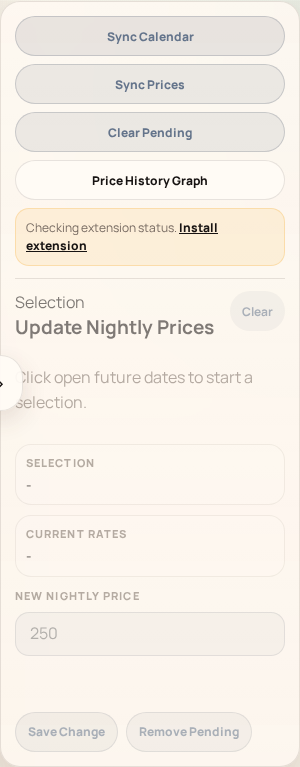
Airbnb sync and publishing controls remain disabled until the desktop browser extension is ready.
More use cases
Follow the walkthrough that matches what you need to do next. Screenshots use sample data; select an image to enlarge it.
- Price a specific weekend or apply the full pricing model
- Create a promotion for an open gap, then remove it
- Follow a Run all batch and resolve listings that need attention
Price a specific weekend or apply the full pricing model
Use this to choose the correct review scope before publishing prices.
- Open the property in Competitors with the extension connected in desktop Chrome. Select Sync Calendar to refresh open dates and current prices.
- For a specific weekend, select its open future dates, enter New Nightly Price and choose Save Change. Use the right-side Sync Prices to review the staged before-and-after prices. If unwanted dates appear, cancel the review, select those dates and use Remove Pending, then reopen the review. Confirm Sync N Prices when it contains only the intended changes.
- For the model, choose a strategy under Dynamic Pricing, set Minimum Price and Lead Time, then use that section’s Sync Prices (N). Review all eligible open nights across the 90-day model, not just your selected weekend.
- Confirm only the intended review. Check the publish result in Activity and refresh the calendar to verify the saved prices. Booked, unavailable and active-promotion dates are excluded from modeled changes.
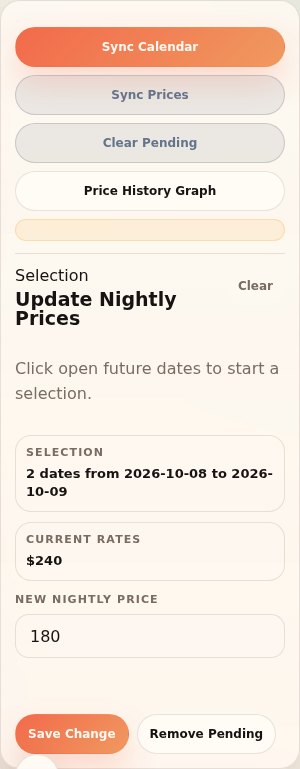
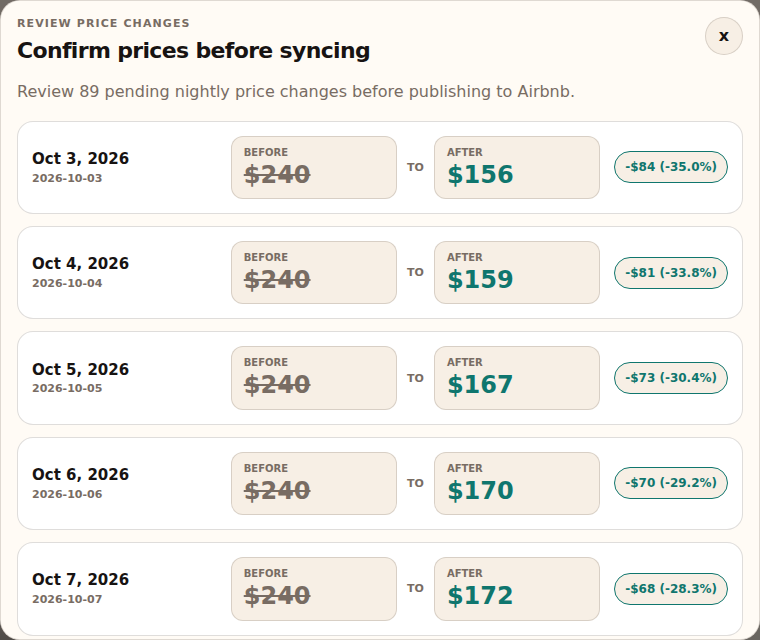
Example: To set Friday and Saturday to $180, stage those two dates and inspect the staged-price review. The Dynamic Pricing review may propose changes to many other nights.
What to expect: Save Change only stages a local edit; the final sync confirmation publishes to Airbnb. Confirming the model replaces pending edits within its model horizon.
Before publishing, Remove Pending discards the selected local edits and Clear Pending discards all staged edits. Neither action reverses prices already published to Airbnb.
Create a promotion for an open gap, then remove it
Use this for an Airbnb custom promotion on a consecutive set of open nights.
- Choose the property, then use Sync Calendar and Sync Promotions to check current availability, prices and active offers.
- Under Custom promotions, select consecutive open nights, up to 14, and enter a Discount % from 1 to 99. Current synced prices must cover the selected dates.
- Select Apply Promotion to open the review. Check the dates, per-night impact and totals, then select the review’s Apply Promotion only when you intend to publish. Airbnb performs the final eligibility check.
- To remove an offer later, select Sync Promotions, then its row’s Remove, or select offers and choose Remove Selected (N). Confirm and check the refreshed offers and Activity result.
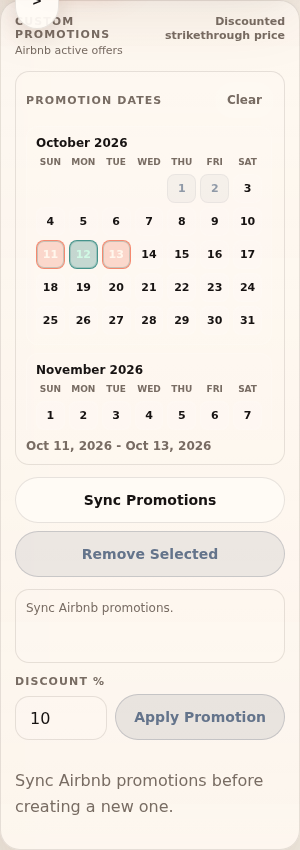
Example: For three open midweek nights, review a 10% promotion across those dates. If an existing offer conflicts, inspect it before trying to apply another.
What to expect: The promotion is managed on Airbnb. It is separate from staged nightly-price edits, so Clear Pending does not remove it.
Follow a Run all batch and resolve listings that need attention
Use this when refreshing several properties or returning after leaving the Competitors page.
- Select Run all, then open its saved entry in Activity. Inspect the per-property calendar preparation and analysis results.
- You can navigate away during the saved batch. Keep the original Chrome profile running for extension downloads; closing Chrome pauses that work.
- If Airbnb sign-in is requested, restore it in the same Chrome profile. If the extension is missing, use Use public availability when offered. A busy extension runner waits for its current work to finish.
- Check each property’s outcome after the batch finishes. Resolve a reported issue and run the affected property’s Run Analysis again as needed; a finished batch can still contain failed calendar reads or analyses.
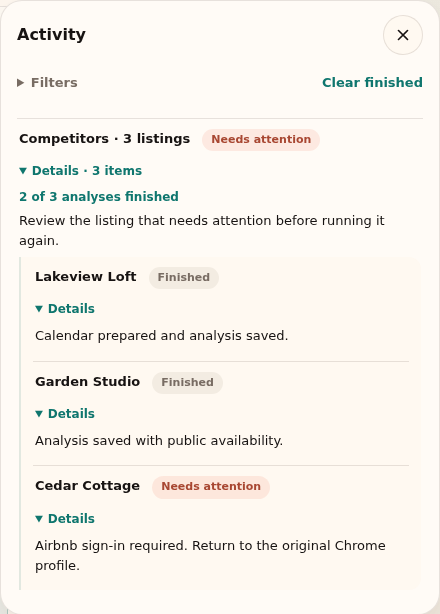
What to expect: Successful work remains saved and each listing’s outcome stays visible. Public availability does not supply private host prices or enable extension-only publishing.
Start in Competitors. If the Airbnb controls stay unavailable, open the extension guide. For setup problems, contact support.
Frequently asked questions
Common questions about analysis and pricing recommendations.
Does Run Analysis change my Airbnb listing?
No. Run Analysis only imports and refreshes comparison data. It does not change prices, availability, or listing details on Airbnb.
When should I refresh an analysis?
Refresh the first time you open a property, when its label is Stale or Out of date, or before making an important pricing decision.
Does dragging the Recommendation Curve publish a price?
No. Dragging an editable point stages the change inside Signal-Panda. Publishing requires Sync Prices and a separate review.
Why are some dates not editable?
Booked, unavailable, or active-promotion dates remain visible for context but are excluded from editable model pricing.